Engineering Makerspace & Machine Shop
Experience a hands-on space where you can design, build, test, and bring ideas to life through real projects.
Inside The Makerspace
When you walk into the makerspace, the layout reflects how work actually happens. It is open, organized, and built for movement between different stages of a project. You might start at a computer designing something, move to a machine to build it, and then test or adjust your work in another area.
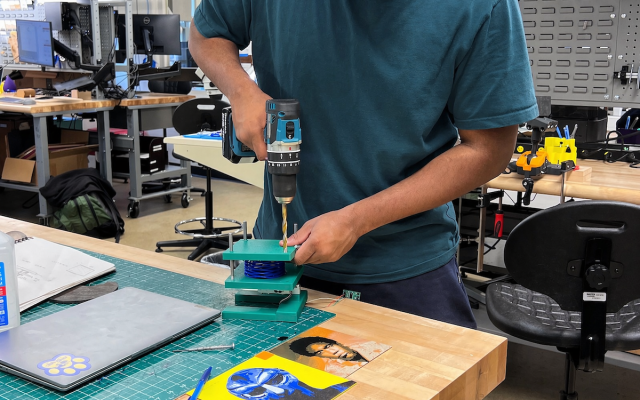
Watch students in action as they use the space—not just observe. They are working with machines, discussing ideas, and improving their designs in a focused, collaborative environment where projects are constantly evolving.
📐 Design
In this space, you focus on creating ideas and planning solutions to real-world problems. This can include designing prototypes, thinking through challenges, and applying what you know beyond theory. Over time, you begin to understand how to approach problems thoughtfully and develop a foundation in the design process.
🔨 Build
Here, you bring your ideas to life by building and developing projects. You engage in hands-on, project-based learning that allows you to turn concepts into real outcomes. Collaboration is a key part of this stage, as you work with others, share ideas, and problem-solve together to create stronger results.
🔍 Test & Refine
At this stage, you evaluate your work by testing how well it performs and identifying areas for improvement. Through trial and error, you revise and strengthen your designs. This process helps build critical thinking skills and teaches you how to continuously improve your work based on feedback and results.
Tools & Technology Avaliable
3D Printing
3D printing creates physical objects from digital designs by layering material. Students use it to prototype ideas quickly, experiment with new concepts, and test how their designs function in real life.
Laser Cutting & Fabrication
Laser cutting uses a precise laser to cut or engrave materials like wood, acrylic, or cardboard. Students use it to fabricate parts for projects and bring detailed designs to life.
Design & Modeling Software
Design and modeling software allows students to create and refine digital versions of their ideas. These tools are used to plan projects, simulate designs, and prepare files for production.
Build & Testing Areas
Build and testing areas are dedicated spaces where students assemble and evaluate their projects. Students use these areas to experiment, troubleshoot, and improve their designs through hands-on testing.
Continue Exploring
Widener University’s engineering spaces immerse you in hands-on learning with industry-relevant tools and technology, preparing you to design, build, and solve real-world challenges throughout your education and beyond.